
Fast checkout and receipting
Ring up sales quickly with barcode or manual entry, and print or send digital receipts.
Sell faster, track stock, and get paid without the hassle
Fast checkout and receipting
Inventory and stock control
M-Pesa and card payments
Point of Sale (POS) System gives retail and commerce operations teams one structured place to manage the day-to-day records already described in the solution, instead of relying on disconnected notebooks, spreadsheets and messages.
The solution brings together Fast checkout and receipting, Inventory and stock control, M-Pesa and card payments, with the remaining operational areas connected through the same workflow. Each capability is designed to make the underlying record easier to find, update and hand over between the people responsible for the work.
For organisations in Kenya and East Africa, the implementation can be configured around the business's actual process, reporting needs, users and approved integrations. The goal is a practical system that is easy to search, easier to operate and scalable as the organisation grows.
Point of Sale (POS) System gives retail & commerce teams a structured way to replace scattered spreadsheets, notebooks and disconnected tools with one searchable workflow for daily operations, reporting, customer records and management decisions.
The modules below are based on the underlying Zinen system design and show how the solution can be organized for day-to-day operations.
Ring up sales quickly with barcode or manual entry, and print or send digital receipts.
Track stock levels in real time and get alerts before items run out.
Accept M-Pesa, card, and cash at the till with automatic reconciliation.
Run several branches or tills under one central account.
See top-selling items, peak hours, and cashier performance.
Generate compliant invoices and receipts for tax reporting.
These images show the type of environment, people, assets or workflow the system is designed to support. The software is tailored around the operational records and processes described on this page.

Shoppers browsing in a retail store

Mobile phone payment at a point of sale

Printed receipt and digital invoicing records
Zinen Technologies is based at Bazaar Plaza, Moi Avenue, Nairobi. Every Point of Sale (POS) System deployment is configured, tested and supported by a local team who understands how businesses in Kenya operate — including M-Pesa payments and local compliance requirements.
Speak to our Nairobi teamPeople often search for
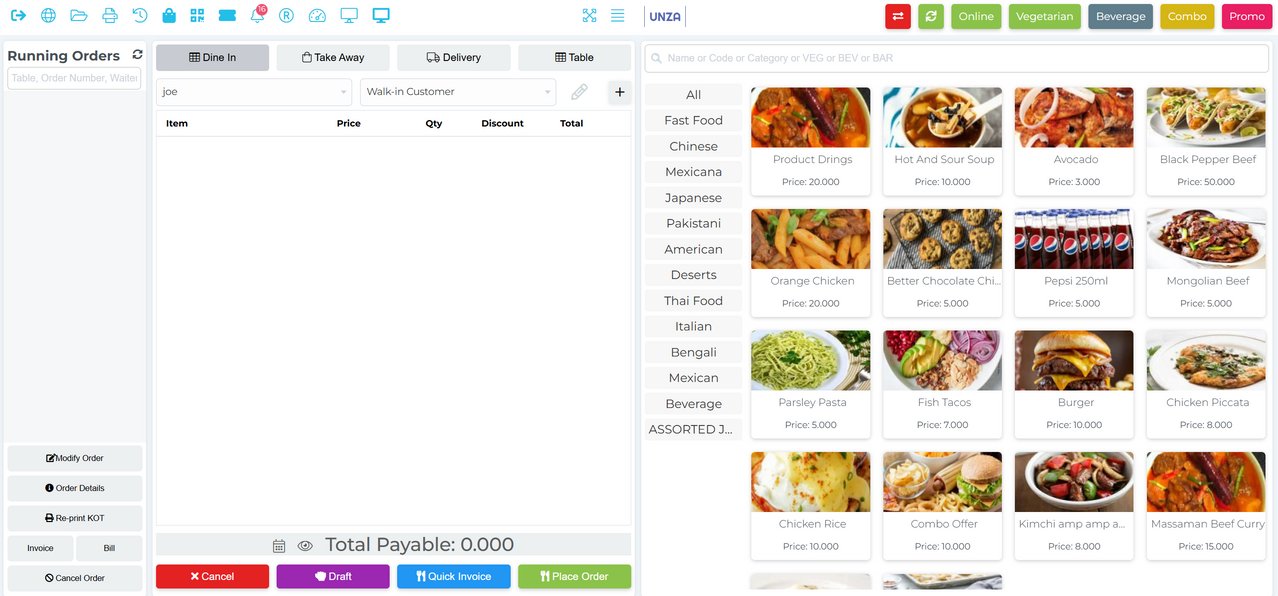
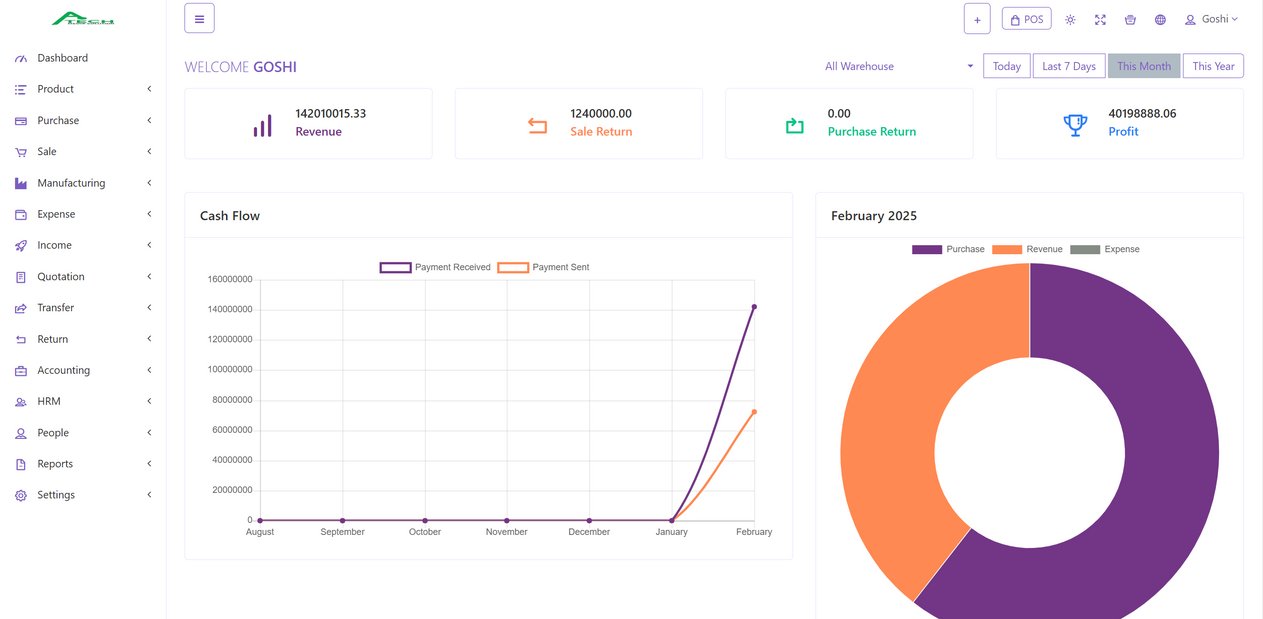
The same POS core configured two ways: a restaurant front-of-house with table, dine-in, takeaway and delivery flows, and a retail back office with revenue, cash flow and profit reporting.
Yes, M-Pesa, card, and cash are all supported with automatic reconciliation.
Yes, stock reduces automatically with each sale, with low-stock alerts.
Yes, multi-branch and multi-till setups are supported with consolidated reporting.
Yes, the system supports eTIMS-ready invoicing for tax compliance.
It covers Fast checkout and receipting, Inventory and stock control, M-Pesa and card payments, Multi-branch and multi-till support, Sales and staff performance reports. The exact configuration can be adapted to the organisation's workflow.
It is designed to bring the listed operational records into one searchable digital workflow, reducing the need for disconnected manual registers.
Yes. Zinen configures software around the organisation’s process, users, reporting requirements and approved integrations.
Yes. Zinen builds and supports business software from Nairobi and can configure the workflow around Kenyan operating requirements.

Following on from the operational challenges furniture businesses face — here's what actually changes once inventory, orders and delivery live in one connected system instead of three separate places.

Furniture isn't like most retail — a single sale can take weeks from order to delivery, and most of what goes wrong happens in that gap. Here's where furniture businesses actually lose money.

Every POS system claims to "handle sales and inventory." The differences that actually matter show up once you look past the sales pitch — here's what to check.
Book a free demo and we'll show you exactly how it fits your workflow — no obligation.

